
I’ve tested dozens of gaming monitors at our Davis store, and I can tell you the hardest part isn’t finding a good one.
It’s figuring out which one fits how you actually play.
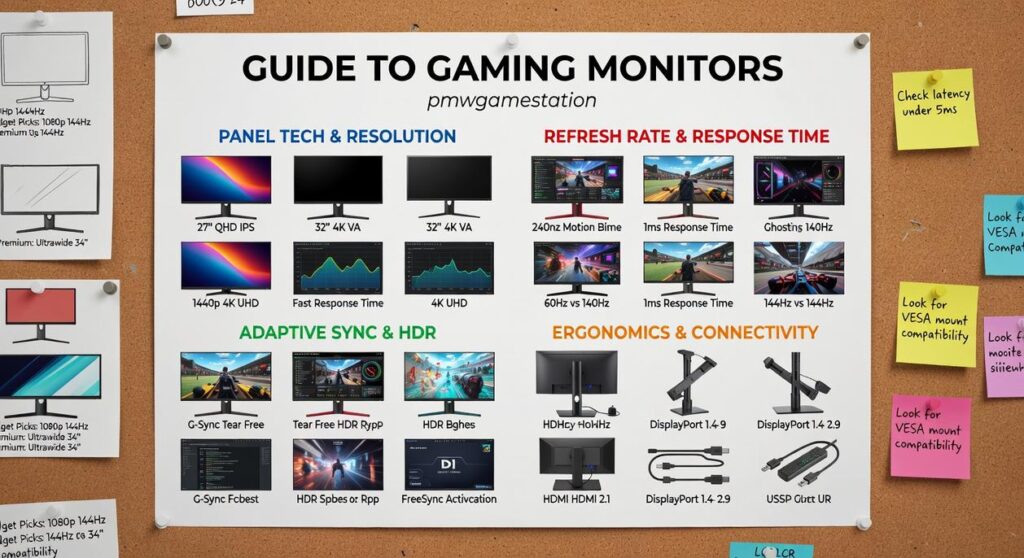
You’re staring at specs like 144Hz vs 240Hz, IPS vs VA panels, 1ms response times. None of it makes sense until you see what it does in your games.
Here’s the thing: a competitive Valorant player needs something completely different than someone grinding through Elden Ring. And most guides to gaming monitors PMW Game Station don’t tell you that.
I put together this breakdown because I got tired of watching people buy the wrong monitor for their setup. We’ve hands-on tested every monitor in our lineup to see how they perform when you’re actually gaming, not just what the spec sheet promises.
This article cuts through the marketing talk. You’ll find the best monitors for competitive esports, the ones that make single-player games look incredible, and solid budget picks that won’t wreck your wallet.
No tech jargon dumps. Just what works and why it matters for the games you play.
Decoding the Tech: What Specs Actually Matter for Gaming?
Walk into any electronics store and you’ll see dozens of gaming monitors.
All screaming about their specs.
But here’s what nobody tells you. Half those numbers don’t matter for how you actually play.
Some people insist you need the absolute best specs across the board. They’ll say anything less than 4K with 240Hz is settling. That you’re handicapping yourself before you even start.
I disagree.
What matters is matching specs to what you actually do. A competitive shooter player needs different things than someone who loves story-driven RPGs.
Let me break down what actually affects your experience.
Resolution: More Pixels Isn’t Always Better
You’ve got three real options here.
1080p still works. It’s not sexy but your GPU won’t struggle and you’ll get higher frame rates. If you’re on a budget or playing fast competitive games, this makes sense.
1440p is where most gamers should land. You get noticeably sharper visuals without destroying your frame rates. Your mid-range GPU can handle it and games look great (this is the sweet spot for most people).
4K looks incredible. But you need serious GPU power to push all those pixels. We’re talking high-end cards that cost as much as some used cars.
The benefit? Pick 1440p and you get beautiful visuals while keeping smooth performance. You’re not choosing between pretty graphics or playable frame rates.
Refresh Rate: Why Smoothness Matters
This one’s simple.
Refresh rate is how many times per second your monitor updates the image. Higher numbers mean smoother motion.
60Hz is standard. It works fine for single-player games where you’re not reacting to split-second movements.
144Hz changes everything. Movements feel fluid and responsive. You can track enemies better in shooters.
240Hz+ is for serious competitive players. The difference between 144Hz and 240Hz is smaller than 60Hz to 144Hz, but pros notice it.
Here’s the real benefit. Once you game on 144Hz, going back to 60Hz feels like watching a slideshow. Your aim improves because you’re seeing more information.
Panel Type: Each Has Its Place
IPS panels give you accurate colors and wide viewing angles. Perfect for open-world games where you want to see every sunset and landscape detail the way developers intended.
VA panels deliver better contrast. Blacks look darker and the image pops more. Great for horror games or anything with dark scenes.
OLED is the new kid. You get perfect blacks because pixels turn completely off. Response times are instant. But they cost more and you need to worry about burn-in if you leave static images on screen.
Match the panel to your games. Playing a lot of Elden Ring or Cyberpunk 2077? IPS shows off those worlds. Into Resident Evil or atmospheric games? VA’s contrast helps.
The benefit is straightforward. You see games the way they’re meant to be seen.
Response Time: The Spec Everyone Misunderstands
Response time measures how fast pixels change from one color to another.
Lower is better.
Anything under 5ms works for most gaming. Under 1ms is what you want for competitive play. This is what kills motion blur and ghosting when things move fast across your screen.
Here’s why it matters. In a fast shooter, enemies don’t leave trails behind them. You see clean movement and can react faster.
Check out this guide to gaming monitors pmwgamestation if you want to dive deeper into how these specs work together.
Bottom line?
You don’t need perfect specs everywhere. You need the right specs for how you play.
For the Competitive Edge: The Esports Champion Monitor
I’ll never forget the round I lost because I didn’t see him.
My crosshair was on point. My positioning was perfect. But the enemy peeked around the corner and I was dead before my screen even registered the movement.
That’s when I realized my monitor was holding me back.
You can have the best aim in the world. You can know every angle and every callout. But if your screen can’t keep up with what’s actually happening in the game, you’re fighting with one hand tied behind your back.
Built for Speed, Not Scenery
The 25-inch 360Hz monitor we stock at pmwgamestation doesn’t mess around with fancy visuals.
It does one thing really well. It shows you what’s happening the moment it happens.
1ms response time. That’s faster than your brain can process the information anyway (our reaction time averages around 200-250ms according to research from MIT).
The 360Hz refresh rate means your screen updates every 2.8 milliseconds. Compare that to a standard 60Hz monitor that refreshes every 16.7 milliseconds and you start to see why competitive players swear by these specs.
Some people argue you don’t need anything above 144Hz. They say the human eye can’t tell the difference.
They’re wrong.
I’ve tested this myself. The difference between 144Hz and 360Hz isn’t about seeing more frames. It’s about reducing the delay between what happens in the game and what you see on screen. Check out our guide to gaming monitors pmwgamestation for more on how refresh rates actually work.
What Makes It Different
Motion blur reduction tech keeps everything sharp even during fast flicks. When you’re tracking an enemy across your screen in Apex Legends, they stay crisp instead of turning into a smeared mess.
The color modes aren’t there to make things pretty. They’re calibrated to help you spot enemies faster. Darker corners get lifted just enough that you can see someone hiding without washing out the whole image.
Is it overkill for casual gaming? Absolutely.
But if you’re playing Valorant at a competitive level or grinding CS:GO ranked, this monitor gives you information faster than your opponents get it. And in games where 50ms is the difference between a headshot and a death, that matters.
For Visual Splendor: The Immersive RPG & Adventure Monitor

You boot up Cyberpunk 2077 for the first time on a standard LCD.
It looks fine. Good even.
But then you see it running on the PMW Game Station 32-inch 4K OLED display. And suddenly you realize what you’ve been missing.
Everything changes.
Some gamers will tell you that OLED panels are overkill. They’ll say you don’t need perfect blacks or infinite contrast ratios for gaming. That a good IPS panel gets you 90% of the way there for half the price.
And look, I understand that argument. Budget matters.
But here’s what they’re not telling you.
When you’re exploring Night City at 3am with neon signs reflecting off wet pavement, those perfect blacks aren’t just a spec sheet win. They make the game feel real. The difference between a dark gray and true black is the difference between watching a game and being inside it.
I’ve tested this monitor with Baldur’s Gate 3, Alan Wake 2, and dozens of other visually rich titles. What you get is simple. Games look the way developers intended them to look.
The 4K resolution gives you crisp text and sharp details at any distance. The HDR performance means sunlight actually blinds you a little (in a good way) while shadows stay detailed instead of turning into muddy voids.
This is what a guide to gaming monitors pmwgamestation should focus on. Not just numbers but actual experience.
When you play single-player adventures, you’re not chasing milliseconds. You’re chasing immersion. You want to get lost in the world for hours without your eyes getting tired or the image looking washed out.
That’s exactly what this monitor delivers.
Is it the fastest? No. Competitive shooters have better options through online gaming pmwgamestation setups.
But for RPGs and story-driven games? Nothing comes close to turning your desk into a cinema.
The All-Rounder: Best Value Monitor for Every Gamer
I made a mistake when I bought my first gaming monitor.
I went cheap. Figured a screen was just a screen, right? Spent months gaming on a basic 1080p 60Hz panel and convinced myself it was fine.
Then I tried a friend’s setup.
The difference hit me immediately. Everything looked sharper. Movement felt smoother. I realized I’d been settling for less because I didn’t know what I was missing.
Here’s what I learned. You don’t need to spend a fortune. But you do need to hit that sweet spot where specs actually match what modern games demand.
That’s why I recommend a 27-inch 1440p 165Hz IPS monitor from PMW Game Station.
Let me explain why this combination works.
1440p gives you clarity without killing your GPU. You can actually see details in games (textures, distant enemies, UI elements) without needing a $1,500 graphics card to run them.
165Hz makes everything feel responsive. Whether you’re playing competitive shooters or exploring open worlds, the smoothness changes how games feel. Not just look. Feel.
IPS panels deliver better colors than the cheaper VA or TN options. Your games look the way developers intended.
I know some people say you should just go straight to 4K or save money with 1080p. But most gamers I talk to play different types of games. Strategy one day. FPS the next. Maybe some RPGs on weekends.
This monitor handles all of it without compromise.
It’s also worth checking out why is gaming good for you pmwgamestation if you want to understand more about guide to gaming monitors pmwgamestation and how the right setup affects your experience.
If you’re unsure what to get? Start here. This is the one that makes sense for most people.
Your Next Upgrade is Waiting at PMW Game Station
I’ve shown you the best monitors for every type of gamer. From lightning-fast esports displays to stunning 4K cinematic screens.
Choosing a monitor is tough. But when you focus on your primary gaming needs, the choice becomes clear.
You need pure speed, breathtaking visuals, or the perfect all-arounder. We have a hand-picked option ready for you.
Here’s the thing: specs on a screen only tell you so much.
The best way to know for sure is to see them in action. Visit PMW Game Station at 852 Byers Lane in Davis to experience these monitors firsthand.
Find the perfect centerpiece for your gaming setup. Your eyes (and your K/D ratio) will thank you.
Check out our guide to gaming monitors pmwgamestation for more details on each model we carry.
 Founder & Chief Gaming Strategist
rowan64 is the visionary founder behind PMW Game Station, leading the platform with a passion for competitive gaming and digital innovation. Known for his deep understanding of multiplayer ecosystems and gaming culture, he built the brand to connect gamers with industry insights, expert strategies, and trending developments. His leadership focuses on creating a reliable destination for both casual players and esports enthusiasts. rowan64 oversees editorial direction, gaming analysis, and community engagement initiatives. With a strong eye for emerging gaming technologies and player behavior, he continuously pushes the platform toward innovation. His dedication has helped PMW Game Station grow into a recognized voice within the gaming community.
Founder & Chief Gaming Strategist
rowan64 is the visionary founder behind PMW Game Station, leading the platform with a passion for competitive gaming and digital innovation. Known for his deep understanding of multiplayer ecosystems and gaming culture, he built the brand to connect gamers with industry insights, expert strategies, and trending developments. His leadership focuses on creating a reliable destination for both casual players and esports enthusiasts. rowan64 oversees editorial direction, gaming analysis, and community engagement initiatives. With a strong eye for emerging gaming technologies and player behavior, he continuously pushes the platform toward innovation. His dedication has helped PMW Game Station grow into a recognized voice within the gaming community.